
bgIW5Call of Duty: Modern Warfare 3
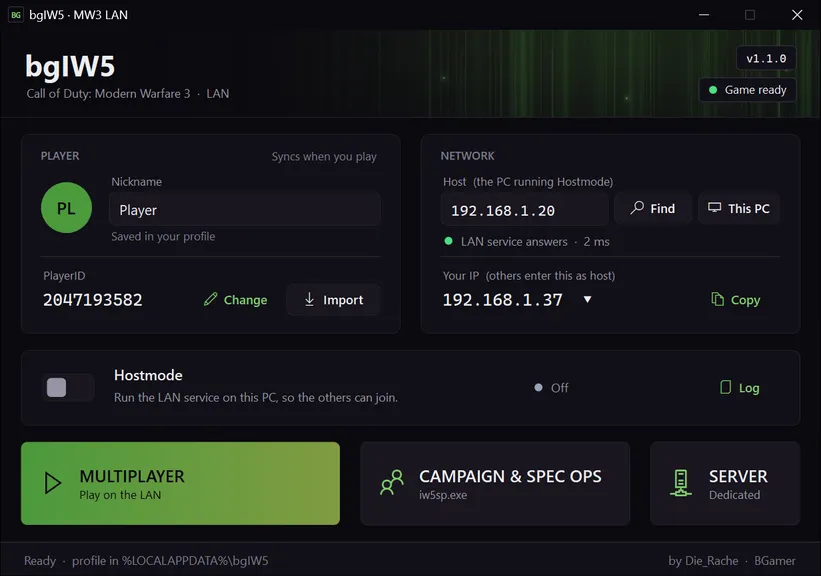
Play Modern Warfare 3 multiplayer and Special Ops co-op over a local network. One PC runs Hostmode, the others connect to its IP address. Private matches, invites, matchmaking and dedicated servers work without any internet service.
- v1.1.0Latest release
bgIW5-v1.1.0.zip · 705 KB · Windows x86 x64
from downloads.bgamer.dev · SHA-256 and older versions
Capabilities
- LAN multiplayer: Private matches: the host invites the others, or they join through the in-game friends list.
- Matchmaking: Find Game on the LAN, from 2 players, through the host’s LAN service.
- Friends list and invites: Everyone logged in to the host is in the in-game friends list.
- Dedicated server: Set up in the launcher: name, game mode, maps, players, password. Listed in the game’s server browser.
- Special Ops co-op: Over LAN, with invites.
- Player stats: Kept in your own profile and synced with whoever hosts, so they follow you to any host.
Releases
v1.1.0
2026-11-05
Adds the current Steam version of Modern Warfare 3 (2.0 build 15, 64-bit, since August 2026) next to the 1.4 build. Multiplayer, matchmaking and Special Ops co-op work with it on the LAN.
Changes
- Supports the current Steam version of Modern Warfare 3 (2.0 build 15, 64-bit, August 2026) next to the 1.4 build. The launcher sees which one you have and installs the matching files.
- Multiplayer with the Steam version: private matches, parties and invites, joining through the friends list, and matchmaking.
- Special Ops co-op (private and matchmaking) and the campaign with the Steam version.
- The launcher starts the Steam version directly with your settings. The Steam client has to be running.
- Hostmode also answers the Steam version’s login (TCP port 3080).
- The message after the login points to bgamer.dev.
- Logs stay small: a log over 5 MB starts over at the next game start.
- File
- bgIW5-v1.1.0.zip
- Size
- 705 KB
- Served from
- downloads.bgamer.dev
SHA-256
.sha256 fileb4b94fbb038e1cbb2a3cde7658d0b96520aa41d5eb67b19bb0797021aa95ad10
Verify in PowerShell: Get-FileHash bgIW5-v1.1.0.zip -Algorithm SHA256 (upper or lower case doesn't matter)
Older versions (1)
v1.0.0
2026-10-17
The first numbered release of bgIW5, with a new launcher. It supports only the Modern Warfare 3 build of the earlier bgIW5 installations (1.4, January 2012).
Changes
- New launcher interface, the same as bgT5’s.
- PlayerID and nickname stored on your own PC, with import of an existing player from an old game folder.
- Your stats travel with you: they are kept in your profile and synced with whoever hosts.
- One LAN service in the launcher for multiplayer, Special Ops and dedicated servers. No internet access needed.
- In-game friends list on every PC, party invites and joining a friend’s party.
- Special Ops co-op over LAN.
- Matchmaking lobbies show the players’ names instead of "Matched Player".
- Dedicated server set up in the launcher: name, game mode, maps, players, password. The server starts its map rotation by itself and appears in the server browser.
- The launcher finds Modern Warfare 3 and installs, updates or removes bgIW5 in the game folder. The game’s files are kept.
- Find hosts on your network with one click, and choose the network you play on (LAN, Wi-Fi, VPN, Hamachi…).
- No administrator rights needed for playing or Hostmode. Logs and crash reports in %LOCALAPPDATA%\bgIW5.
- Built on .NET Framework 4.8.
- File
- bgIW5-v1.0.0.zip
- Size
- 425 KB
- Served from
- downloads.bgamer.dev
SHA-256
.sha256 file82d533aee7623f4a38ad9d784df7bbac8f9fb97a754d886b8488eabd12e23dee
Verify in PowerShell: Get-FileHash bgIW5-v1.0.0.zip -Algorithm SHA256 (upper or lower case doesn't matter)
LAN setup
For v1.1.0, the version you can download now.
Installation
- 1.Extract the bgIW5 package to any folder, for example Documents.
- 2.Start bgIW5Launcher.exe. It finds Modern Warfare 3; if not, choose the game folder.
- 3.Click Install when the launcher offers it. It copies the files for your version into the game folder (steam_api64.dll and bgiw5_64.dll for the Steam version, steam_api.dll and bgiw5.dll for 1.4) and keeps the file that was there as a backup.
Remove bgIW5 puts the original file back. Install, Update and Remove bgIW5 are behind the game status at the top right of the launcher.
Host a game
- 1.Switch on Hostmode.
- 2.Allow network access if Windows asks.
- 3.If you have more than one network (Wi-Fi, VPN, Hamachi), click Your IP and choose the one you play on.
- 4.Make sure Host shows your own IP address: click This PC.
- 5.Start Multiplayer and open a private match, then invite the others from the friends list. For Special Ops: start Campaign & Spec Ops and open a private Special Ops lobby.
The other players find you with Find. You can also send them your IP; Your IP has a Copy button. Matchmaking (Find Game) works too, in Multiplayer and Special Ops: everyone playing through the same host is matched together.
Join a game
- 1.Click Find and choose the host, or enter the host’s IP address under Host.
- 2.Wait for "LAN service answers".
- 3.Start Multiplayer, or Campaign & Spec Ops for Special Ops.
- 4.Accept the host’s invite, or join the host through the in-game friends list.
Dedicated server
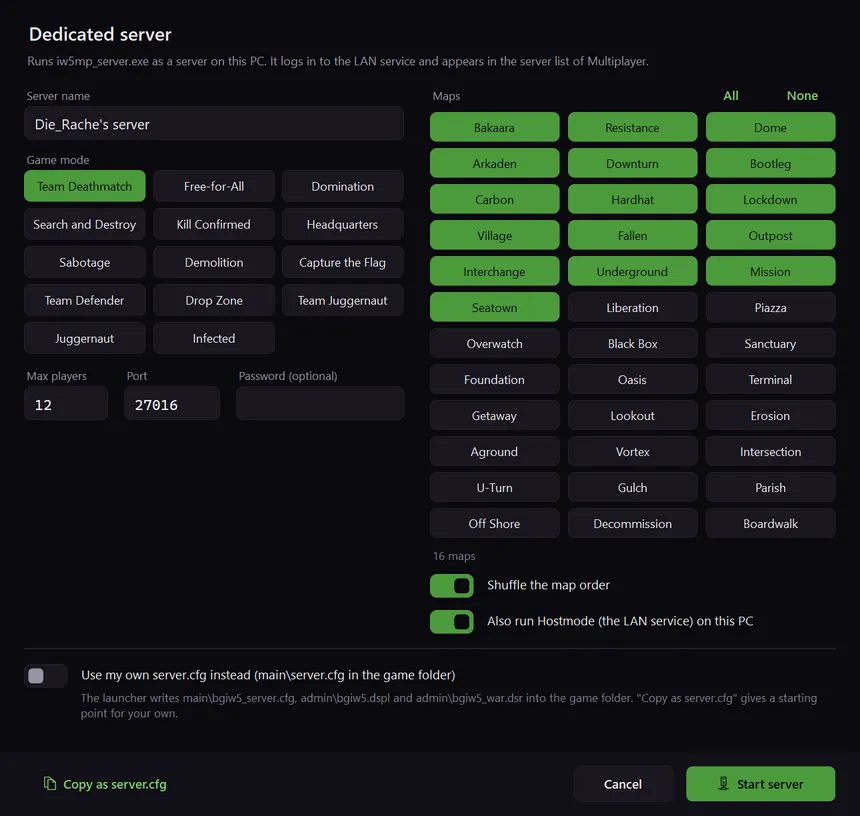
- 1.Click Server, next to Multiplayer.
- 2.Choose a server name, game mode, maps, players and, if you like, a password.
- 3.Click Start server. The server starts its map rotation; players join it from the server browser in Multiplayer.
- The dedicated server needs the 1.4 iw5mp_server.exe. Steam’s "MW3 Dedicated Server" is only a placeholder now, and the launcher says so.
- Also run Hostmode on this PC starts the LAN service too, if it isn’t running yet. The server logs in to it.
- The server uses the network chosen under Your IP. It writes its settings into the game folder (main\bgiw5_server.cfg and the admin folder).
- Use my own server.cfg starts the server with main\server.cfg from the game folder instead, and warns about common mistakes in it, such as a missing start_map_rotate. Copy as server.cfg gives you a starting point.
Network
| Port | Protocol | Purpose |
|---|---|---|
| 3078 | TCP | Game online service (on the host) |
| 3078 | UDP | Address detection for the game (on the host) |
| 3079 | TCP | bgIW5 service: friends, invites, stats sync (on the host) |
| 3079 | UDP | Finding hosts on the network |
| 3080 | TCP | Login of the Steam version (on the host) |
| 27950 | UDP | Server list for dedicated servers (on the host) |
| 3074 | UDP | Game traffic between players (the game takes the next free port if it’s in use) |
| 27016 | UDP | Dedicated server (default; can be changed). It also uses the two ports around it. |
If Windows asks, allow bgIW5Launcher.exe, iw5mp.exe, iw5sp.exe and iw5mp_server.exe. A firewall rule made by hand needs all of these ports.
LAN setup for v1.0.0
LegacyFor the older v1.0.0 release. Use v1.1.0 unless you need this version.
Show v1.0.0 requirements and instructions
Requirements
- Windows. All components are 32-bit and run on 64-bit Windows.
- Call of Duty: Modern Warfare 3 with the 1.4 executables (iw5mp.exe, iw5sp.exe, iw5mp_server.exe from January 2012), as in the earlier bgIW5 installations. Other builds start without bgIW5’s patches.
- .NET Framework 4.8 — included in Windows 10 (1903 and later) and Windows 11.
- No administrator rights needed. Installing bgIW5 into a game folder under "Program Files" asks for them once.
Installation
- 1.Extract the bgIW5 package to any folder, for example Documents.
- 2.Start bgIW5Launcher.exe. It finds Modern Warfare 3; if not, choose the game folder.
- 3.Click Install when the launcher offers it. It copies bgIW5 into the game folder and keeps the steam_api.dll that was there as a backup.
Remove bgIW5 puts the old steam_api.dll back. Install, Update and Remove bgIW5 are behind the game status at the top right of the launcher.
Host a game
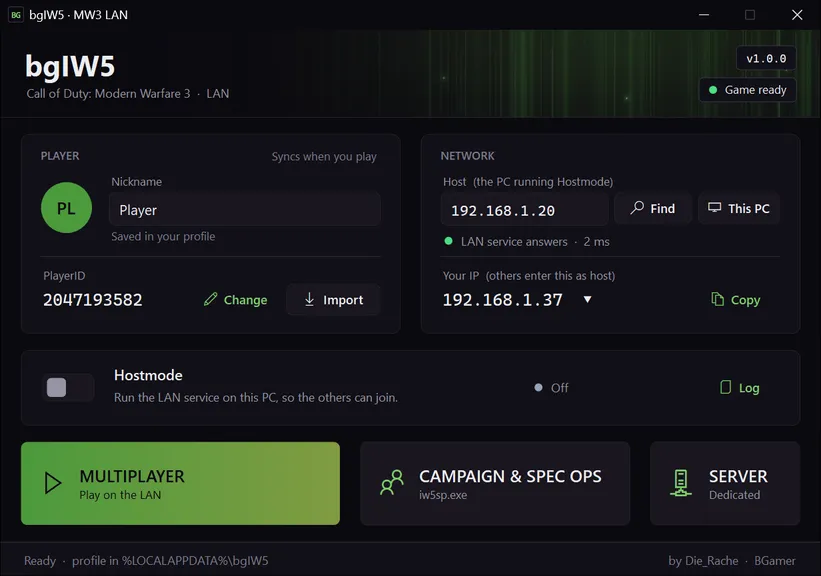
- 1.Switch on Hostmode.
- 2.Allow network access if Windows asks.
- 3.If you have more than one network (Wi-Fi, VPN, Hamachi), click Your IP and choose the one you play on.
- 4.Make sure Host shows your own IP address: click This PC.
- 5.Start Multiplayer and open a private match, then invite the others from the friends list. For Special Ops: start Campaign & Spec Ops and open a private Special Ops lobby.
The other players find you with Find. You can also send them your IP; Your IP has a Copy button. Matchmaking (Find Game) works too: everyone playing through the same host is matched together.
Join a game
- 1.Click Find and choose the host, or enter the host’s IP address under Host.
- 2.Wait for "LAN service answers".
- 3.Start Multiplayer, or Campaign & Spec Ops for Special Ops.
- 4.Accept the host’s invite, or join the host through the in-game friends list.
Dedicated server
- 1.Click Server, next to Multiplayer.
- 2.Choose a server name, game mode, maps, players and, if you like, a password.
- 3.Click Start server. The server starts its map rotation; players join it from the server browser in Multiplayer.
- Also run Hostmode on this PC starts the LAN service too, if it isn’t running yet. The server logs in to it.
- The server uses the network chosen under Your IP. It writes its settings into the game folder (main\bgiw5_server.cfg and the admin folder).
- Use my own server.cfg starts the server with main\server.cfg from the game folder instead, and warns about common mistakes in it, such as a missing start_map_rotate. Copy as server.cfg gives you a starting point.
Network
| Port | Protocol | Purpose |
|---|---|---|
| 3078 | TCP | Game online service (on the host) |
| 3078 | UDP | Address detection for the game (on the host) |
| 3079 | TCP | bgIW5 service: friends, invites, stats sync (on the host) |
| 3079 | UDP | Finding hosts on the network |
| 27950 | UDP | Server list for dedicated servers (on the host) |
| 3074 | UDP | Game traffic between players (the game takes the next free port if it’s in use) |
| 27016 | UDP | Dedicated server (default; can be changed). It also uses the two ports around it. |
If Windows asks, allow bgIW5Launcher.exe, iw5mp.exe, iw5sp.exe and iw5mp_server.exe. A firewall rule made by hand needs all of these ports.
Known issues
- Two versions of Modern Warfare 3 are supported: the current Steam version (2.0 build 15, 64-bit, 2026) and the 1.4 executables (January 2012). Players of the two versions can’t play together. Other builds start without bgIW5’s patches.
- The Steam version needs the Steam client running.
- Dedicated servers run with the 1.4 iw5mp_server.exe only; Steam’s dedicated server for Modern Warfare 3 is a placeholder. Players with the Steam version can’t be expected to join a 1.4 server.
- DLC content, such as Special Ops Chaos Mode, needs the DLC installed through Steam; bgIW5 doesn’t unlock it.
- Dedicated server: Gun Game and One in the Chamber can’t be chosen (the game’s server recipes don’t offer them), and time and score limits are the game’s defaults.
- IPv4 only. Find uses a broadcast, which doesn’t cross routers, and some VPNs drop it; entering the host’s IP always works.
- Windows asks at the first Hostmode start whether to let the launcher through the firewall. Allow it, or the others can’t connect.