
bgIW4Call of Duty: Modern Warfare 2
Play Modern Warfare 2 multiplayer and Special Ops co-op over a local network. One player hosts a private match or a co-op lobby, the others join it with Join Host. No external master server is involved.
- v2.0.0Latest release
bgIW4-v2.0.0.zip · 350 KB · Windows x86
from downloads.bgamer.dev · SHA-256 and older versions
Capabilities
- LAN multiplayer: In private matches. One player hosts, the others join with Join Host or connect <IP>.
- Special Ops co-op: Two Player Online over LAN, joined with Join Host.
Not supported
- Matchmaking — Find Game needs Infinity Ward’s online service. Play in a private match instead.
- Dedicated server — Not part of this release.
Releases
v2.0.0
2026-10-22
The first maintenance release of bgIW4, with a new launcher. It supports only the Modern Warfare 2 build of the earlier bgIW4 installations (multiplayer build 177, singleplayer build 159); the current Steam version isn’t supported yet.
Changes
- New launcher interface, the same as bgT5’s.
- PlayerID and nickname stored on your own PC, taken over from an existing bgset.ini.
- The launcher finds Modern Warfare 2 and installs, updates or removes bgIW4 in the game folder. It keeps the game’s own file names: iw4mp.exe and iw4sp.exe are written from the old bgIW4mp.exe and bgIW4sp.dat.
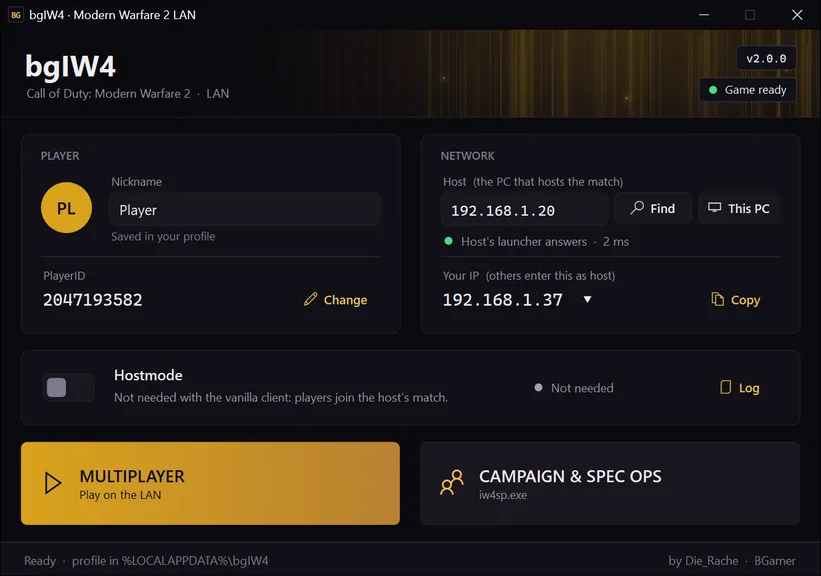
- Join Host in the private match joins the host set in the launcher. No console needed.
- Special Ops co-op over LAN: Two Player Online no longer waits for Infinity Ward’s servers, and the partner joins with Join Host.
- No master server needed: Hostmode is no longer part of playing.
- Find lists everyone on your network who has the launcher open; you pick the host.
- The launcher checks the host before starting and shows whose launcher answers.
- Choose the network you play on (LAN, Wi-Fi, VPN, Hamachi…).
- The client changes only what LAN play needs; mods and the old custom menus are gone.
- Log file for the game’s Steam emulation.
- Built on .NET Framework 4.8.
- File
- bgIW4-v2.0.0.zip
- Size
- 350 KB
- Served from
- downloads.bgamer.dev
SHA-256
.sha256 fileaf2d7ea116107e5b7b27c471ebcacffba1fa03a4f24f82ef45ac2f4f201e9020
Verify in PowerShell: Get-FileHash bgIW4-v2.0.0.zip -Algorithm SHA256 (upper or lower case doesn't matter)
LAN setup
For v2.0.0, the version you can download now.
Installation
- 1.Extract the bgIW4 package to any folder, for example Documents.
- 2.Start bgIW4Launcher.exe. It finds Modern Warfare 2; if not, choose the game folder.
- 3.Click Install when the launcher offers it. It copies bgIW4 into the game folder, keeps a steam_api.dll of the game’s own as a backup and writes iw4mp.exe and iw4sp.exe from the old bgIW4mp.exe and bgIW4sp.dat. The old files stay.
Remove bgIW4 takes bgIW4 out of the game folder again; the game’s files stay. Install, Update and Remove bgIW4 are behind the game status at the top right of the launcher.
Host a game
- 1.If you have more than one network (Wi-Fi, VPN, Hamachi), click Your IP and choose the one you play on.
- 2.Click This PC under Host.
- 3.Start Multiplayer and open a Private Match.
- 4.For Special Ops co-op instead: start Campaign & Spec Ops, open Special Ops and choose Two Player Online.
Hostmode isn’t needed; with this release it’s greyed out. The others find you with Find. You can also send them your IP; Your IP has a Copy button.
Join a game
- 1.Click Find and choose the host, or enter the host’s IP address under Host.
- 2.Wait until the status under Host says that the host’s launcher answers.
- 3.Start Multiplayer, open a Private Match and press Join Host.
- 4.For Special Ops co-op instead: start Campaign & Spec Ops, choose Special Ops, Two Player Online, and press Join Host.
- 5.Instead of Join Host, typing connect followed by the host’s IP in the console works too.
Network
| Port | Protocol | Purpose |
|---|---|---|
| 28960 | UDP | Game traffic: multiplayer and Special Ops co-op |
| 3076 | UDP | Finding the other launchers and checking the host |
If Windows asks, allow bgIW4Launcher.exe, iw4mp.exe and iw4sp.exe. A firewall rule made by hand needs both ports.
Known issues
- Only the Modern Warfare 2 build of the earlier bgIW4 installations is supported (multiplayer 177, singleplayer 159). The current Steam version is a newer build; support for it is planned.
- Matchmaking (Find Game) doesn’t work. Play in a private match: the host opens one, the others open a private match too and press Join Host.
- Special Ops co-op: the first start of a mission can hang on "Waiting for the other player". Leave and start it again.
- Special Ops co-op: quitting during a mission can restart the map instead of going back to the lobby.
- IPv4 only. Find uses a broadcast, which doesn’t cross routers, and some VPNs drop it; entering the host’s IP always works.
- Windows may ask at the launcher’s first start whether to let it through the firewall: it answers the other launchers’ Find.