
bgFC3Far Cry 3
Play Far Cry 3’s online co-op and private multiplayer matches over a local network again. One PC runs Hostmode in the launcher and answers instead of Ubisoft’s online services; the others log in to it. XP, unlocks, loadouts and tattoos are kept on your own PC and follow you to whichever PC hosts. You can also play in offline mode.
- v0.1.0Latest release
bgFC3-v0.1.0.zip · 385 KB · Windows x86
from downloads.bgamer.dev · SHA-256 and older versions
Capabilities
- Online co-op over LAN: Private co-op: invite the others from the in-game friends list and play the co-op chapters.
- Private multiplayer matches: Over LAN, with invites from the friends list.
- Friends list and invites: Everyone logged in to the host is in the in-game friends list. It updates when My Setup is opened.
- Progress that follows you: XP, rank, unlocks, loadouts, tattoos and statistics are kept under your PlayerID on your own PC and synced with whoever hosts.
- LAN party without internet: In offline mode; the story saves are then kept locally.
- DirectX 9 and 11: The launcher starts the version set in the game.
- Steam and Ubisoft Connect versions: Far Cry 3 1.06, the last patch.
Not supported
- Quick match (matchmaking) — Not part of 0.1.0.
- Leaderboards — Not part of 0.1.0.
- Custom maps — Not part of 0.1.0.
- Intel (decoding CDs) — CDs earned in a match are not kept.
Releases
v0.1.0
2026-11-04
The first release of bgFC3: Far Cry 3’s co-op and multiplayer on the LAN again. It supports Far Cry 3 1.06, the last patch, from Steam or Ubisoft Connect.
Changes
- Online co-op and private multiplayer matches through a host on your network, with the in-game friends list and invites.
- Your progress travels with you: XP, rank, unlocks, loadouts, tattoos and statistics are kept under your PlayerID on your own PC and follow you to whichever PC hosts. The level and new unlocks are there right after a match.
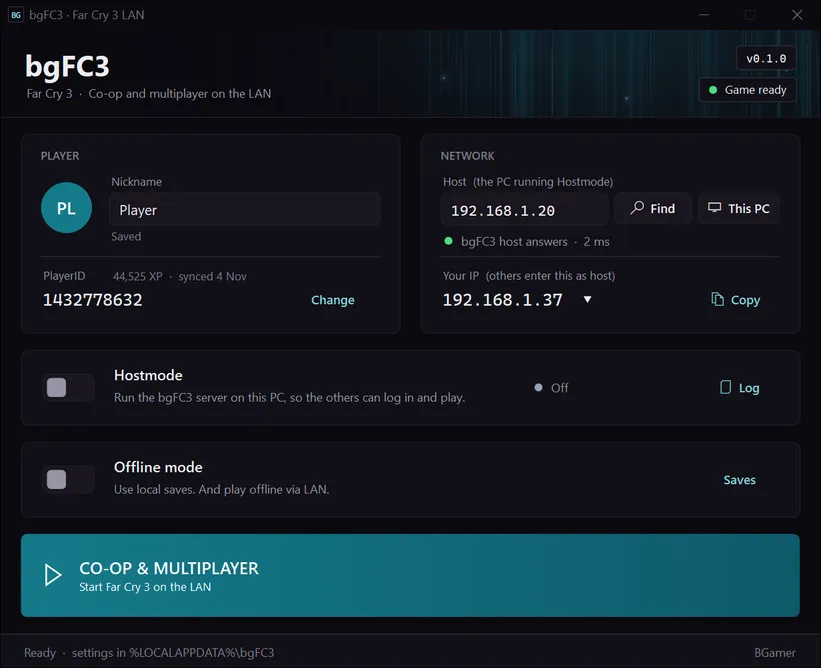
- A launcher in BGamer’s style: it finds Far Cry 3, installs and removes bgFC3, finds hosts on the network and starts the game with DirectX 9 or 11 as set in the game.
- Offline mode for a LAN party without internet, with the story saves kept locally.
- Crash reports and a Diagnostics log for bug reports in %LOCALAPPDATA%\bgFC3.
- The launcher shows when a newer bgFC3 is out.
- Built on .NET Framework 4.8.
- File
- bgFC3-v0.1.0.zip
- Size
- 385 KB
- Served from
- downloads.bgamer.dev
SHA-256
.sha256 file96f04eafd8af8201e4f0eccedc374a6b570fab3b12764799ae4605ee5fcbb9c1
Verify in PowerShell: Get-FileHash bgFC3-v0.1.0.zip -Algorithm SHA256 (upper or lower case doesn't matter)
LAN setup
For v0.1.0, the version you can download now.
Installation
- 1.Extract the bgFC3 package to any folder, for example Documents. Not into the game folder.
- 2.Start bgFC3Launcher.exe. It finds Far Cry 3; if not, choose the game folder.
- 3.Install bgFC3 when the launcher offers it. It copies two files into the game’s bin folder and keeps Ubisoft’s upc_r1_loader.dll as a backup.
- 4.Enter your nickname. Everyone needs a different one.
Install, Update and Remove bgFC3 are behind the game status at the top right of the launcher. Remove puts Ubisoft’s file back.
Host a game
- 1.Switch on Hostmode.
- 2.Allow network access if Windows asks.
- 3.If you have more than one network, click Your IP and choose the one you play on.
- 4.Click This PC, so Host shows your own IP address.
- 5.Click CO-OP & MULTIPLAYER. In the game, open Online Co-op → Private Co-op (or a private multiplayer match) and invite the others from the friends list.
The other players find you with Find. You can also send them your IP; Your IP has a Copy button. For a LAN party without internet, switch on Offline mode in every launcher and put Ubisoft Connect into its offline mode.
Join a game
- 1.Click Find and choose the host, or enter the host’s IP address under Host.
- 2.Wait for "bgFC3 host answers".
- 3.Click CO-OP & MULTIPLAYER.
- 4.Accept the host’s invite in the game.
Network
| Port | Protocol | Purpose |
|---|---|---|
| 80 | TCP | Online configuration and progress sync (on the host) |
| 21005 | UDP | Login (on the host) |
| 21006 | UDP | Online services: friends, invites, sessions, statistics (on the host) |
| 21007 | UDP | Address detection for the game, with 21008 (on the host) |
| 21009 | UDP | Finding hosts on the network |
| 9000 | UDP | Game traffic between players (the game takes the next free port from 9000 up) |
If Windows asks, allow bgFC3Launcher.exe and Far Cry 3 for private networks. If another program already uses port 80 on the host, run bgFC3Server.exe with --http-port 8080 instead of Hostmode and enter the host as <IP>:8080.
Known issues
- Intel (decoding the CDs earned in multiplayer) doesn’t work: CDs from a match are not kept.
- Weapon unlocks can be announced several times in co-op.
- The in-game friends list updates when My Setup is opened, not while it stays open.
- Quick match (matchmaking), leaderboards and custom maps are not part of 0.1.0.
- IPv4 only. Find uses a broadcast, which doesn’t cross routers, and some VPNs drop it; entering the host’s IP always works.